From time to time, I look back and take tally of what programs and modules
I released in the past. This is one of these posts.
This module is a clone of the Mixmark turndown library,
which converts HTML into Markdown.
my $markdown = html2markdown('<h1>Hello World</h1>');
# Hello World
The module is highly convenient for my
note-taking tool, which lets
me edit notes as contentEditable HTML to enable formatting and pasting
of images etc. .
Other times, I want to do quick text editing, and using Markdown is far more
convenient than editing HTML on my mobile phone. As I store the documents not
as HTML but Markdown, converting from HTML/contentEditable to Markdown is
helpful here.
The nice thing about this module is that I chose to reuse the test suite of
the turndown Javascript library and styled the code similarly to the
Javascript example. That made porting some changes in the Javascript library
to Perl very easy, even if I don't strive for 1:1 identity.
Date::Find - extract dates from filenames
Together with the app move-year, this is a nifty tool to watch my download
directory and move bank statement .pdf files into the corresponding
directories organized by year. Often these files are named in weird ways
like statement-03.01.2025.pdf or accountstatement-2025-january.pdf, but I
want them in a directory bankstatements/2025/ . Date::Find looks at the
filenames and finds the year (and month, and day). The app then creates the
appropriate year (or month, or day) directory and moves the file there.
As my note-taking tool fetches link previews, I want to be a bit more cautious
as to what URLs I freely fetch. This adapts
Net::DNS::Paranoid and the
ruleset to also work for Mojolicious.
What I did not release
That link preview/card generation thing - postponed
Mojolicious::Plugin::UrlWithout
A small HTML page helper that returns an URL without a given key/value combination:
    my $url = "/filter?label=foo&label=bar";
    my $other = url_without( "/filter", label => 'foo' );
   # /filter?label=bar
This module sounded like a really good idea, so I wrote it. The use case was a
search/filter page, where you can toggle different labels by clicking on them.
The labels were realized as <a href=... elements. Then I realized I don't
need it at all, if I switch my HTML to a form with GET and use HTMX to
automatically update the filter:
<form method="GET" action="/filter" hx-get="/filter" hx-trigger="change from:input changed">
<label for="label-foo">foo</label><input type="checkbox" checked name="label" value="foo" />
<label for="label-bar">bar</label><input type="checkbox" checked name="label" value="bar" />
<button type="submit" class="nojs">Apply</button>
</form>
Patches I contributed
I contributed a small change to the
DBD::SQLite catalog functions so it
now also knows about generated columns in a table. Funnily, the old SQLite
function was named table_info, and the function including the generated
columns is named table_xinfo . I guess once there is another type of
information to return, they will need to add table_yinfo, or move to the
Microsoft-stlyle of having table_info_ex(), with another parameter listing
the information actually wanted by the caller.
Patches that were not applied (yet)
Together with Mojo::UserAgent::Paranoid, I also
added IPv6 support to Net::DNS::Paranoid,
but my changes have not yet been reviewed or accepted.
I use that patched module locally, and there it works well.
My development workflow looks something like this
- Implement feature 1
- Implement another feature 2
- Bug fixes for something in feature 2
- Bug fixes for feature 1
- More bug fixes for something in feature 2
This results in a git history like the above, which I then interactively rebase into
add Implement feature 1
squash Bug fixes for feature 1
add Implement another feature 2
squash Bug fixes for something in feature 2
squash More bug fixes for something in feature 2
The git absorb command automates part of the rebase by looking at the currently staged hunks and finding the commit that most recently changed lines in that hunk, and squashing that hunk in that commit:
git add app.pl -p # add the parts for feature 1 and feature 2 that don't overlap
git absorb
I'm doing more stuff with HTMX.
HTMX allows for almost-convenient polling by adding hx-trigger="every 1s" to
an attribute. This allows you to kick off some processing on your server after
having served a page and automagically update the page with the status and
a download link when processing completes.
<div class="preview-card" id="preview-div"
    hx-trigger="every 1s"
    hx-get="/preview"
    hx-swap="outerHTML"
>
Please stand by while we prepare your content
</div>
The polling only works if the element has a hx-get or hx-post attribute. It
does not work on <form> elements with action="..." , surprisingly.
The workaround is to add an explicit hx-get or hx-post="..." attribute
to the element:
<form method="POST" action="/submit"
    hx-trigger="every 1s"
    hx-post="/preview"
    hx-swap="none"
>
<input name="message" type="text" />
...
</form>
I really like HTMX. But its error reporting is severely
lacking. For example, typos or wrong keywords in hx-trigger or other hx-
attributes do only result in a nondescript console entry and a stack trace:
htmx:syntax:error
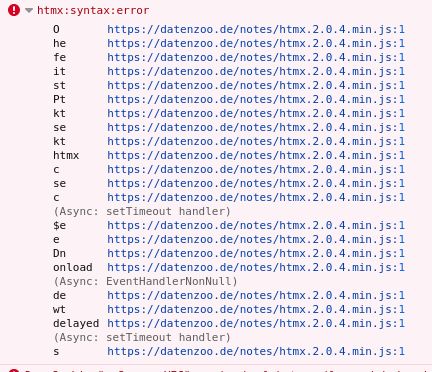
The HTMX documentation suggests only
source-diving as a way to find where the attribute parser chokes. While this
works, it is not convenient. I have to switch from the minified HTMX library
to the development version, and then set a breakpoint on the logging routine,
and from there work my way backwards to the origin of the error. Which is most
of the time a typo or wrong keyword in an attribute.
Luckily, HTMX can invoke a callback on the htmx:syntax:error event, so we can
list the offending elements in the console and make them easily clickable:
htmx.on("htmx:syntax:error", (elt) => { console.log("htmx.syntax.error",elt)});
This still does not report the offending hx- attribute, and also does not
tell us, what keyword was wrong or where the expression went bad, but it
is a lot closer and does not require us to go source diving.
Providing a dark mode is good form nowadays. I like doing/having that too.
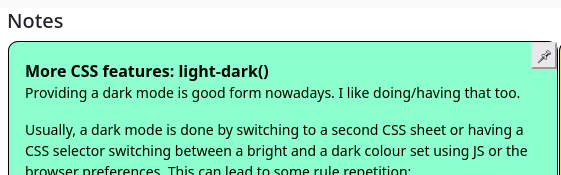
Usually, a dark mode is done by switching to a second CSS sheet or having a CSS selector switching between a bright and a dark colour set using JS or the browser preferences. This can lead to some rule repetition:
.light-theme textarea {
    color: black;
    background-color: #8dfece;
}

.dark-theme textarea {
    color: #62b190;
    background-color: black;
}
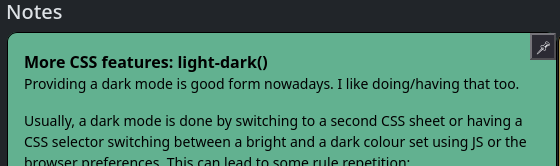
CSS also has a function to do this color switching on an element without needing to repeat the declaration in a second rule: light-dark(color1, color2) will return color1 if the light environment is preferred by the user and color2 if the dark environment is preferred.
textarea {
    color: light-dark( black, black );
    background-color: light-dark( #8dfece, #62b190 );
}
You still might want to give the user an option to set their preference
only for your website, storing that in a cookie. Bootstrap 5 itself
has a fairly thorough, live-switching setup for that, but it's also somewhat
long.
There also is
a short JS snippet on Github
which is mildly simpler to integrate, but which only does the switching
on page load or toggling of the user selection, and not when the user switches
their browsers preference.